Table of Contents
- Introduction
- What is ColPali Vision-Based RAG?
- How ColPali Works: The Architecture
- Implementation Deep Dive
- Input and Output Capabilities
- Core Features
- Real-World Applications
- Getting Started
- Conclusion
Introduction
Imagine searching PDFs as images to retrieve figures, tables, and layout alongside text. ColPali treats document pages as visual entities rather than reducing them to extracted text alone. This guide explains the retrieval pattern and its implementation trade-offs.
What is ColPali Vision-Based RAG?
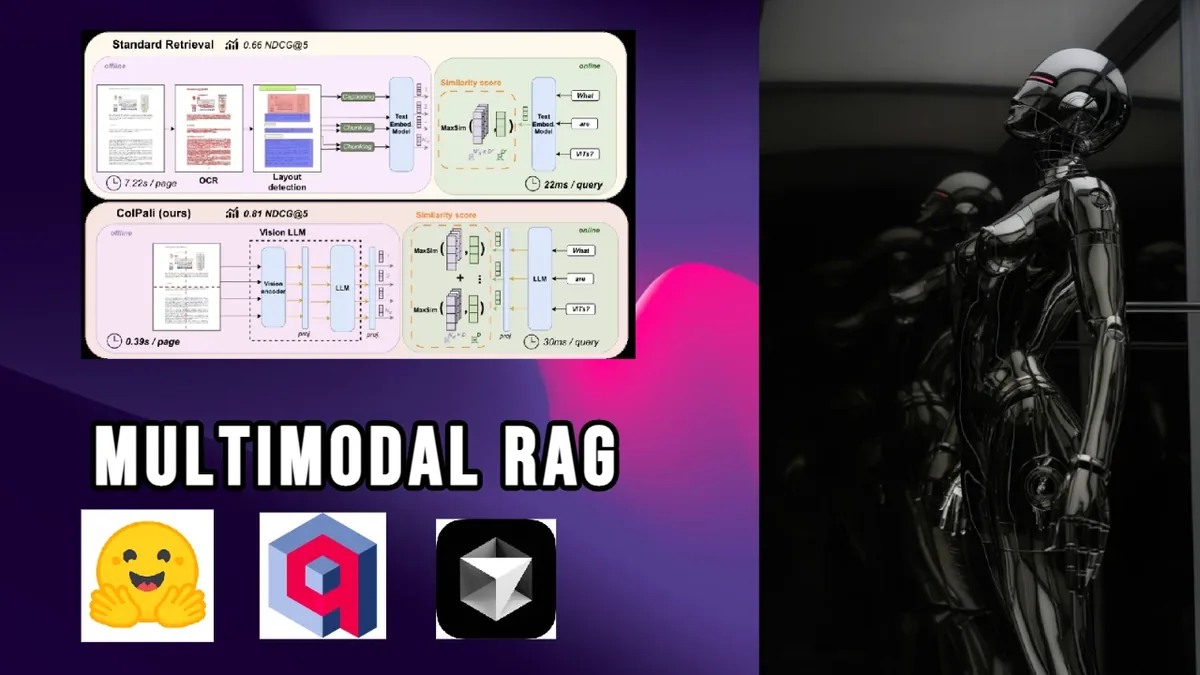
ColPali applies vision-language models directly to document images, reducing dependence on a separate layout-recognition and OCR pipeline. Documents remain visual objects, so layouts, figures, and formatting can contribute to retrieval. The current Transformers ColPali documentation describes the supported retrieval model and processor APIs.
Key Innovation: Patch-Level Embeddings
Unlike traditional approaches that extract text and images separately, ColPali:
- Processes entire document pages as images
- Creates patch-level embeddings for fine-grained understanding
- Enables layout-aware search
- Preserves visual context (charts, tables, formatting)
Why ColPali Is Useful
- No OCR Required: Works directly on document images
- Layout Understanding: Preserves spatial relationships
- Multi-Vector Search: Each page becomes multiple searchable vectors
- Figure/Table Awareness: Naturally understands visual elements
How ColPali Works: The Architecture
The Visual Document Processing Pipeline:
graph TD
    A[PDF Document] --> B[Page Images]
    B --> C[ColPali Vision Model]
    C --> D[Patch-Level Tokens]
    D --> E[Multi-Vector Embeddings]
    E --> F[Qdrant Storage]

    G[Text Query] --> H[Query Processing]
    H --> I[Token Embeddings]
    I --> J[Multi-Vector Search]
    F --> J
    J --> K[Relevant Pages]
    K --> L[GPT-4V Analysis]
Technical Architecture:
# ColPali processes documents as images
embed_model = ColPali.from_pretrained(
    "vidore/colpali-v1.2",
    torch_dtype=torch.float32,
    device_map="cpu"
)

# Multi-vector configuration for Qdrant
vectors_config={
    "size": 128,  # Per-token embedding size
    "distance": "Cosine",
    "multivector_config": {
        "comparator": "max_sim"  # Maximum similarity across tokens
    }
}
Implementation Deep Dive
My implementation (multimodal_RAG_colpali.py) demonstrates the main retrieval components:
1. Smart Embedding Generation
class EmbedData:
    def embed(self, images):
        for i, img in enumerate(images):
            inputs = self.processor.process_images([img]).to("cpu")
            with torch.no_grad():
                outputs = self.embed_model(**inputs).cpu().numpy()
                # outputs shape: [1, num_patches, embedding_dim]
            self.embeddings.append(outputs[0])
Key aspects:
- Processes full page images
- Generates multiple embeddings per page
- Preserves spatial information
2. Advanced Query Processing
def embed_query(self, query_text):
    # Special token for image-text alignment
    query_with_token = "<image> " + query_text

    # Create blank image for query processing
    blank_image = Image.new('RGB', (224, 224), color='white')

    # Process through ColPali
    query_inputs = self.processor(
        text=query_with_token,
        images=[blank_image],
        return_tensors="pt"
    )
3. Dynamic Content Detection
def find_content_page(content_type, number, all_vectors, client):
    """Dynamically find pages containing specific figures/tables"""
    focused_query = f"Find {content_type} {number}"
    search_emb = embeddata.embed_query(focused_query)

    # Multi-vector search across all page patches
    response = client.query_points(
        collection_name="pdf_docs",
        query=vectors,
        limit=5
    )
4. Intelligent Caching System
# Check for cached embeddings
pickle_path = f"{pdf_name}_embeddings.pkl"
if os.path.exists(pickle_path):
    with open(pickle_path, 'rb') as f:
        embeddata.embeddings = pickle.load(f)
else:
    # Process and cache
    embeddata.embed(images)
    with open(pickle_path, 'wb') as f:
        pickle.dump(embeddata.embeddings, f)
Input and Output Capabilities
What You Can Input:
-
PDF Documents
-
Research papers
- Technical manuals
- Reports with mixed content
-
Scanned documents
-
Natural Language Queries
- "Show me Figure 3"
- "Find tables about performance metrics"
- "Locate the system architecture diagram"
- "What does the methodology section say?"
Query Understanding Examples:
Figure/Table Queries:
Input: "What is figure 3 about also display figure 3"
Process:
1. Extracts figure reference: "figure 3"
2. Searches for pages containing Figure 3
3. Retrieves and displays the image
4. Provides GPT-4V analysis
Content-Aware Queries:
Input: "Find all pages with flowcharts"
Output: Pages ranked by visual similarity to flowchart patterns
Output Capabilities:
{
  "query": "Show neural network architecture",
  "results": [
    {
      "page": 5,
      "confidence": 0.94,
      "content_type": "diagram",
      "description": "Neural network architecture with 3 hidden layers..."
    }
  ],
  "image_saved": "output/page_5.jpg",
  "gpt_analysis": "This diagram illustrates a deep neural network..."
}
Core Retrieval Features
1. Multi-Vector Search Magic
# Each page becomes multiple searchable vectors
if query_emb.ndim == 3:
    all_vectors = query_emb[0].tolist()  # All token embeddings
    print(f"Using {len(all_vectors)} token embeddings for search")
This enables:
- Fine-grained matching at patch level
- Better handling of complex layouts
- Improved figure/table detection
2. Visual Query Understanding
The system understands queries about:
- Document structure ("find the introduction")
- Visual elements ("show all bar charts")
- Specific content ("Figure 3 about neural pathways")
- Layout patterns ("tables with multiple columns")
3. Automatic Content Recognition
# Pattern matching for different content types
figure_match = re.search(r'fig(?:ure)?\s+(\d+)', query.lower())
table_match = re.search(r'table\s+(\d+)', query.lower())
page_match = re.search(r'page\s+(\d+)', query.lower())
4. Intelligent Response Generation
- Combines visual search with GPT-4V analysis
- Provides context-aware explanations
- Automatically saves and displays relevant images
Real-World Applications
1. Academic Research
- Search across thousands of papers visually
- Find specific experimental setups
- Locate similar graph patterns
- Cross-reference figures with text
2. Technical Documentation
- Find installation diagrams quickly
- Search for error message screenshots
- Locate configuration examples
- Navigate complex manual layouts
3. Medical Records
- Search for specific scan types
- Find diagnostic charts
- Locate treatment flowcharts
- Cross-reference imaging with reports
4. Legal Documents
- Find specific contract clauses by layout
- Search for signature pages
- Locate exhibits and appendices
- Navigate complex legal structures
5. Educational Content
- Find specific diagram types
- Search for mathematical equations
- Locate exercise sections
- Navigate textbook layouts
Getting Started
Prerequisites:
pip install colpali-engine pdf2image qdrant-client \
            torch pillow openai python-dotenv
Environment Setup:
OPENAI_API_KEY=your_openai_key
QDRANT_URL=your_qdrant_url
QDRANT_API_KEY=your_qdrant_key
Basic Usage:
# Initialize ColPali
embeddata = EmbedData()

# Convert PDF to images
images = convert_from_path("document.pdf")

# Create embeddings (with caching)
embeddata.embed(images)

# Search for content
query = "Find Figure 3 about neural networks"
results = search_with_colpali(query)
Advanced Features
1. Performance Optimization
# Batch processing with timeout handling
max_retries = 3
for retry in range(max_retries):
    try:
        client.upsert(collection_name="pdf_docs", points=batch)
        break
    except Exception as e:
        time.sleep(2)
2. Query Enhancement
def should_show_image(query):
    """Intelligent detection of display intent"""
    show_phrases = ["show", "display", "see", "view"]
    return any(phrase in query.lower() for phrase in show_phrases)
3. Cross-Page Context
# Add context pages
if page_num > 0:
    relevant_pages.append(images[page_num-1])
if page_num < len(images)-1:
    relevant_pages.append(images[page_num+1])
Performance Considerations
1. CPU Optimization
- Runs efficiently on CPU
- No GPU required
- Suitable for edge deployment
2. Caching Strategy
- Embeddings cached to disk
- Avoids reprocessing
- Fast subsequent searches
3. Scalability
- Handles large PDF collections
- Efficient multi-vector storage
- Cloud-ready with Qdrant
Best Practices
-
Document Preparation
-
Ensure good PDF quality
- Higher resolution = better results
-
Consider page limits for large documents
-
Query Formulation
-
Be specific about content types
- Use natural language
-
Include "show" or "display" for visualization
-
Performance Tuning
- Adjust batch sizes
- Implement retry logic
- Monitor embedding generation time
Future Directions
ColPali represents the future of document understanding:
- Multimodal native: Treats documents as visual entities
- Layout-aware: Understands spatial relationships
- Efficient: No complex preprocessing pipelines
- Scalable: Works with massive document collections
Conclusion
ColPali provides an alternative to text-only document retrieval. By treating pages as images and using patch-level embeddings, it can preserve visual context that an OCR-only pipeline may discard. The trade-offs are larger embeddings, model compute, and more specialized retrieval infrastructure.
This approach is particularly powerful for:
- Documents with complex layouts
- Mixed content (text, figures, tables)
- Scanned or image-based PDFs
- Scenarios requiring visual understanding
Key Takeaways:
- ColPali eliminates the need for OCR and text extraction
- Multi-vector search enables fine-grained retrieval
- Vision-based approach preserves document context
- Caching and batching patterns that still need corpus-specific load testing
ColPali is most useful when page layout, figures, or tables carry meaning that a text-only extraction pipeline would lose. Benchmark it against OCR-based retrieval on your own document set before choosing the added compute cost.